cagedlion "I am the problem, and I am the solution." Joined Jul 9, 2013 Messages 10,424 Likes 7,931 Points 113 Nov 26, 2013 #1 Wishing all a very 'thankful' day. Wishing the Rangers better days ahead.
Denny Crane It's not even loaded! Staff member Administrator Joined May 24, 2007 Messages 73,124 Likes 10,973 Points 113 Nov 26, 2013 #2 Thanks! Happy Thanksgiving everyone
M mrmel29 Well-Known Member Joined Jul 4, 2013 Messages 10,414 Likes 4,763 Points 113 Nov 26, 2013 #3 Yes. Hqppy Thanksgiving. Wish we had some easy access icons on the site to use like those above.
Denny Crane It's not even loaded! Staff member Administrator Joined May 24, 2007 Messages 73,124 Likes 10,973 Points 113 Nov 26, 2013 #4 mrmel29 said: Yes. Hqppy Thanksgiving. Wish we had some easy access icons on the site to use like those above. Click to expand... : cheers : without the spaces Click on the Go Advanced message below the post editor. It gives you a much more complete editor with a choice of a couple hundred smilies/icons.
mrmel29 said: Yes. Hqppy Thanksgiving. Wish we had some easy access icons on the site to use like those above. Click to expand... : cheers : without the spaces Click on the Go Advanced message below the post editor. It gives you a much more complete editor with a choice of a couple hundred smilies/icons.
M mrmel29 Well-Known Member Joined Jul 4, 2013 Messages 10,414 Likes 4,763 Points 113 Nov 26, 2013 #5 Thanks denny Party
M mrmel29 Well-Known Member Joined Jul 4, 2013 Messages 10,414 Likes 4,763 Points 113 Nov 26, 2013 #6 mrmel29 said: Thanks denny Party Click to expand... ahhhhhhhhh, I suck at this
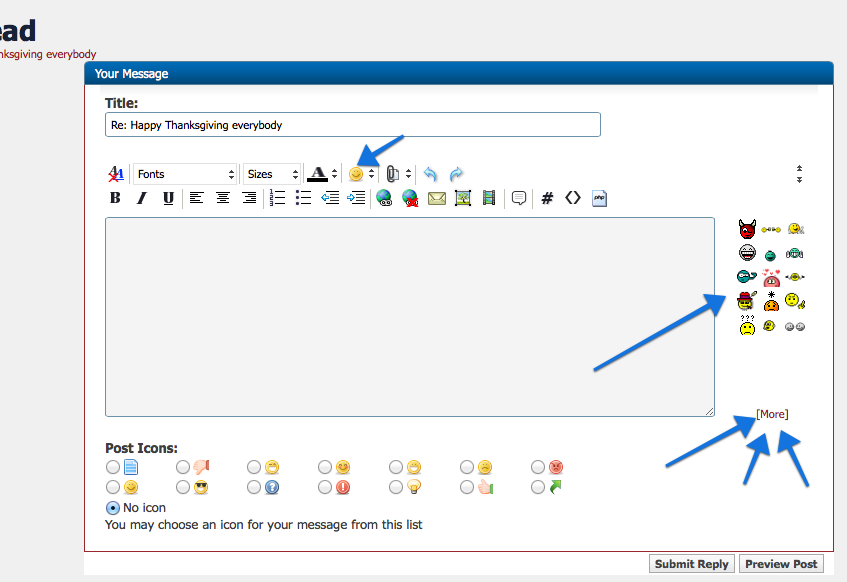
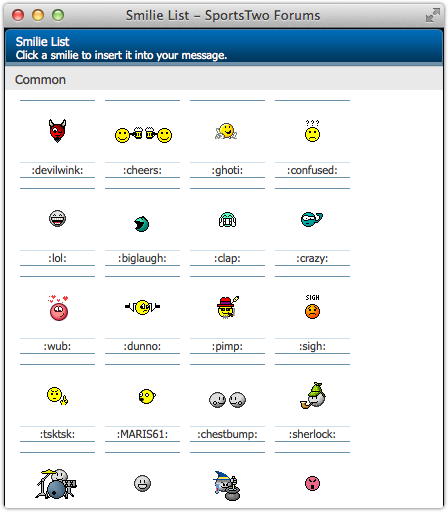
Denny Crane It's not even loaded! Staff member Administrator Joined May 24, 2007 Messages 73,124 Likes 10,973 Points 113 Nov 26, 2013 #7 After you click on advanced editor you'll see this: When you click on the [More] link, you'll see this popup window: You can click on a smilie to insert it at the cursor. Over time, you can memorize the :smilie: shorthand that you can just type in directly.
After you click on advanced editor you'll see this: When you click on the [More] link, you'll see this popup window: You can click on a smilie to insert it at the cursor. Over time, you can memorize the :smilie: shorthand that you can just type in directly.
M mrmel29 Well-Known Member Joined Jul 4, 2013 Messages 10,414 Likes 4,763 Points 113 Nov 26, 2013 #8 ok, I think I got it.
Denny Crane It's not even loaded! Staff member Administrator Joined May 24, 2007 Messages 73,124 Likes 10,973 Points 113 Nov 26, 2013 #9 Glad to help.